How to Replace Light Bulbs on a 2026 Harley-Davidson Road Glide (FLTRX)
Light Bulb Replacement Guide: 2026 Harley-Davidson Road Glide FLTRX
This guide covers every exterior light bulb position on the 2026 Harley-Davidson Road Glide (FLTRX), including the headlight (low/high beam), front and rear turn signals, tail/brake light, front and rear running lights, and license plate light. The Road Glide shares the same platform lighting architecture as other 2026 Touring models.
Quick Reference Bulb Table
| Position | Bulb Type | Wattage | OEM Part Number | LED Upgrade Option |
|---|---|---|---|---|
| Headlight (Low/High Beam) | H13 (9008) | 60W/55W | HARLEY-DAVIDSON 68166-06 | H13 LED (Sylvania ZEVO / Kuryakyn 4760) |
| Front Left Turn Signal | 1157NA (Amber) | 28.3/8.3W | HARLEY-DAVIDSON 68170-99 | 1157 Amber LED |
| Front Right Turn Signal | 1157NA (Amber) | 28.3/8.3W | HARLEY-DAVIDSON 68170-99 | 1157 Amber LED |
| Rear Left Turn Signal | 1157NA (Amber) | 28.3/8.3W | HARLEY-DAVIDSON 68170-99 | 1157 Amber LED |
| Rear Right Turn Signal | 1157NA (Amber) | 28.3/8.3W | HARLEY-DAVIDSON 68170-99 | 1157 Amber LED |
| Tail / Brake Light | 1157 (Dual Contact) | 28.3/8.3W | HARLEY-DAVIDSON 72690-96 | 1157 Red LED (Sylvania ZEVO) |
| Front Running Light (Left) | 1157 | 28.3/8.3W | HARLEY-DAVIDSON 68170-99 | 1157 Warm White LED |
| Front Running Light (Right) | 1157 | 28.3/8.3W | HARLEY-DAVIDSON 68170-99 | 1157 Warm White LED |
| License Plate Light | 194 (W5W/T10) | 2.1W | HARLEY-DAVIDSON 72623-99 | 194 White LED |
| Auxiliary Lamp (if equipped) | H11 | 55W | HARLEY-DAVIDSON 68289-06 | H11 LED |
Difficulty & Time Estimate
- Difficulty Level: Beginner to Intermediate (1 out of 5)
- Estimated Time: 30-60 minutes depending on positions replaced
- Best Done: In a well-lit area with the bike on a stand or level surface
Complete Tool List
| Tool | Size or Type | Purpose |
|---|---|---|
| Torx socket / driver | T-25 | Remove headlight trim ring and housing fasteners |
| Torx socket / driver | T-27 | Turn signal bezel access on some configurations |
| Flathead screwdriver | Small | Gentle prying of trim pieces and bezel clips |
| Needle-nose pliers | Standard | Grip and pull bulbs from sockets |
| Torque wrench | Small (in-lb range) | Re-torque fasteners to spec |
| Clean microfiber cloth | Any | Clean headlight window and bulb glass |
| Isopropyl alcohol (optional) | 70-99% | Clean bulb glass if accidentally touched |
| Gloves | Nitrile | Prevent skin oils from touching bulb glass |
| Dielectric grease | Tub or squeeze tube | Coat bulb contacts to prevent corrosion |
OEM Part Numbers & Aftermarket Alternatives
| Position | OEM Part | Aftermarket Halogen | LED Alternative |
|---|---|---|---|
| Headlight H13 | Harley-Davidson 68166-06 | Sylvania SilverStar H13 | Sylvania ZEVO H13 LED / Kuryakyn 4760 |
| Turn Signal 1157NA | Harley-Davidson 68170-99 | Philips 1157NA Amber | Sylvania ZEVO 1157 Amber LED / Opt7 1157 Amber |
| Tail/Brake 1157 | Harley-Davidson 72690-96 | Philips 1157 X-tremeVision | Sylvania ZEVO 1157 Red LED / JAG-LED |
| Running Light 1157 | Harley-Davidson 68170-99 | Sylvania 1157 Long Life | LEDany 1157 Warm White |
| License Plate 194 | Harley-Davidson 72623-99 | Sylvania 194 | Sylvania ZEVO 194 White LED |
| Auxiliary Lamp H11 (if equipped) | Harley-Davidson 68289-06 | Sylvania SilverStar H11 | Sylvania ZEVO H11 LED |
Step-by-Step Instructions
Headlight (H13) — Low and High Beam
The 2026 Road Glide uses a 7-inch H13 (9008) halogen headlight bulb in its distinctive shark-nose fixed fairing. The H13 is a dual-filament bulb handling both low and high beam.
Step 1: Turn the ignition OFF and allow the headlight to cool if it has been running.
Step 2: The Road Glide's headlight is housed behind the shark-nose fairing. Access requires removing the headlight retaining ring screws from the front. Using a T-25 Torx driver, remove the screws securing the headlight trim ring. Set the screws aside in a small container.
Step 3: Carefully remove the trim ring and set it face-down on a clean cloth to avoid scratches.
Step 4: You will now see the back of the 7-inch headlight assembly. Disconnect the H13 electrical connector from the bulb base by pressing the release tab and pulling straight off.
Step 5: Remove the wire retainer or three retaining screws holding the bulb into the reflector housing. If equipped with a wire retainer, press inward on the retainer clips and slide the retainer clear of the bulb tabs.
Step 6: Pull the old H13 bulb straight out of the reflector housing. Handle by the base only — never touch halogen bulb glass with bare fingers.
Step 7: Remove the new H13 bulb from its packaging and inspect the glass for damage. If handling a halogen, use gloves or a clean cloth to avoid skin oils on the glass. Clean any accidental contact with isopropyl alcohol.
Step 8: Insert the new H13 bulb into the reflector housing, aligning the three mounting tabs (note: one tab is wider for correct orientation) with the housing slots. Push firmly until seated.
Step 9: Reinstall the wire retainer or retaining screws. Verify the bulb is secure and does not wobble.
Step 10: Reconnect the electrical connector, pushing until it clicks.
Step 11: Turn the ignition on and test both low beam and high beam before reassembling.
Step 12: Position the headlight trim ring over the headlight and reinstall the T-25 screws. Tighten evenly and snug — do not over-torque.
Step 13: Aim the headlight beam (see alignment procedure in Tips section below).
Front Turn Signals (1157NA) — Amber
Step 1: The front turn signals are mounted on the lower fork legs. Turn the handlebars to access the inner side of each turn signal.
Step 2: Locate the rubber grommet at the rear of each turn signal housing. Gently pull the grommet back to expose the bulb socket.
Step 3: Turn the bulb socket counterclockwise (approximately one quarter-turn) and pull the socket with the bulb straight out of the housing.
Step 4: Remove the old 1157NA bulb by pressing it gently into the bayonet socket and turning counterclockwise. Pull the bulb out.
Step 5: Insert the new 1157NA amber bulb into the socket. Press in and turn clockwise until it locks.
Step 6: Test the turn signal by activating the switch with the ignition on before reassembling.
Step 7: Reinsert the socket assembly into the turn signal housing and turn clockwise to lock.
Step 8: Reposition the rubber grommet to ensure a proper seal against moisture.
Rear Turn Signals (1157NA) — Amber
Step 1: Access the rear turn signals from behind the rear fender. They are mounted on the rear fender support supports.
Step 2: Reach behind the turn signal housing and locate the rubber access grommet. Pull the grommet aside.
Step 3: Turn the socket counterclockwise and pull the socket with the bulb straight out.
Step 4: Remove the old 1157NA bulb: push in gently and turn counterclockwise to unlock from the bayonet contacts.
Step 5: Install the new 1157NA amber bulb: push into the socket and turn clockwise to lock.
Step 6: Activate the turn signal to verify illumination and proper flash rate.
Step 7: Reinsert the socket into the housing and twist clockwise to secure.
Step 8: Reinstall the rubber access grommet to seal against moisture.
Tail / Brake Light (1157) — Dual Contact
The tail and brake light share a single 1157 dual-filament bulb. The dim filament powers the running tail light; the bright filament activates when the brake is applied.
Step 1: Locate the tail light housing mounted on the tail light bracket behind the Tour-Pak (if equipped) or on the rear fender extension.
Step 2: Remove the tail light housing retaining screws (typically two T-25 Torx screws) from the back of the housing.
Step 3: Carefully pull the tail light housing away from the mounting bracket to access the bulb sockets. Disconnect the wiring harness connector if necessary for full access.
Step 4: Identify the tail/brake bulb socket (usually the center socket in the housing).
Step 5: Turn the socket counterclockwise and remove it.
Step 6: Remove the old 1157 bulb by pushing in and turning counterclockwise.
Step 7: Install the new 1157 bulb: push into the socket and turn clockwise until it locks.
Step 8: Reinsert the socket into the housing and twist to lock.
Step 9: Test all functions: - Ignition ON: dim tail light should illuminate - Brake lever/pedal applied: bright brake light should activate - Turn signal activated: bulb should flash
Step 10: Reinstall the tail light housing and secure with the T-25 screws.
Front Running Lights (1157)
The front running lights share the 1157 dual-filament bulb with the front turn signals on the Road Glide. The running light uses the dim filament; the turn signal uses the bright filament. This is handled internally by the housing wiring — no separate running light bulbs are required.
License Plate Light (194 / W5W / T10)
Step 1: Locate the license plate light assembly behind the rear fender, near the license plate bracket.
Step 2: Reach up from below the fender to locate the small wedge-base socket.
Step 3: Pull the socket straight out from the housing (wedge-base, no twist).
Step 4: Remove the old 194 bulb by pulling it straight out of the socket.
Step 5: Insert the new 194 bulb into the wedge socket, aligning the two exposed contacts with the terminal slots.
Step 6: Reinsert the socket into the housing.
Step 7: Verify illumination with the ignition on.
Auxiliary Lamps (H11) — If Equipped
Step 1: The auxiliary lamps on the Road Glide are typically mounted to the lower fairing supports or engine guard braces.
Step 2: Access the rear of each auxiliary lamp housing. Remove the rear dust cap by turning it counterclockwise.
Step 3: Disconnect the electrical connector from the H11 bulb base.
Step 4: Remove the wire retainer clip holding the H11 bulb by pressing inward and sliding clear.
Step 5: Pull the old H11 bulb straight out of the housing.
Step 6: Insert the new H11 bulb, aligning the two tabs with the retainer holes.
Step 7: Reinstall the retainer clip and reconnect the electrical connector.
Step 8: Replace the dust cap and turn the ignition on to test.
Tips, Warnings & Common Mistakes
Headlight Alignment After Replacement
After replacing the headlight, verify beam alignment:
- Park the Road Glide on level ground, 25 feet from a flat wall.
- Measure the height from the ground to the center of the headlight.
- Draw a horizontal reference line on the wall at the measured height, then draw a second line 2 inches below it.
- Turn on the low beam and note where the bright cutoff line falls.
- The top of the bright zone should be at or slightly below the lower reference line.
- To adjust: Loosen the adjustment screws (up/down and left/right) on the sides and back of the headlight housing. Adjust and retighten.
Road Glide's shark-nose fairing may provide less access for headlight adjustment than the Street Glide's batwing fairing. Use a small right-angle Torx driver if access is limited.
LED vs. Halogen — Pros and Cons
| Feature | Halogen | LED |
|---|---|---|
| Brightness | Good (standard) | Excellent (up to 3x brighter) |
| Color Temperature | 3200K (warm yellow) | 6000K (cool white daylight) |
| Lifespan | 500-1000 hours | 25,000-50,000 hours |
| Power Draw | Higher (60W/55W) | Lower (25-30W equivalent) |
| Heat Generation | High | Low |
| Cost | $10-20 per bulb | $30-80 per bulb |
| Plug-and-play | Yes (OEM spec) | May require load equalizer for turn signals |
| DOT/FMVSS Compliance | Always compliant | Varies — verify for road legality |
LED Flasher Warning: The 2026 Road Glide monitors turn signal circuit load. LED bulbs draw less current and can cause hyper-flashing. Fix with load equalizer resistors (included in most LED kits) or replace the flasher relay with an LED-compatible module (H-D part 68888-05 or aftermarket LED-compatible flasher).
Legal Notes
- Replacement bulbs must comply with DOT/FMVSS 108 for legal road use.
- Turn signals must emit amber light — clear bulbs behind amber lenses are not legal in all states.
- LED headlight color temperature above 6000K (blue tint) may fail inspection.
- The 2026 Touring platform uses a CAN bus system — verify LED compatibility before installing.
Common Mistakes to Avoid
| Mistake | Consequence | Prevention |
|---|---|---|
| Touching halogen bulb glass with bare fingers | Premature bulb failure from oil hotspots | Always use nitrile gloves when handling halogen bulbs |
| Not testing before final reassembly | Need to remove trim again for defective bulb | Test every bulb with the ignition before closing up |
| Skipping load equalizers on LED turn signals | Hyper-flashing and potential error codes | Install load equalizers or LED-compatible flasher relay |
| Over-tightening headlight trim screws | Cracked bezel or stripped fairing threads | Snug by hand, never wrench-tight |
| Installing non-CAN-bus LED bulbs | Error messages on the dash display | Use LEDs labeled "CAN bus ready" or add resistors |
| Incorrect headlight beam aim | Blinding other drivers or reduced visibility | Always check beam aim at 25 feet on a level surface |
| Wrong wattage replacement | Fuse blow or CAN bus error | Match or stay below the OEM wattage rating |
| Omitting dielectric grease | Corrosion, intermittent light operation | Apply a thin layer of dielectric grease to contacts |
| Not resealing rubber boots | Water damage to sockets and wiring | Always reinstall rubber grommets and boots fully |
Verification Notes for 2026 Model Year
The 2026 Road Glide features a new frame and revised shark-nose fairing design compared to 2024 and earlier models. The following specifications should be verified against your owner's manual:
| Item | Standard Value | Notes |
|---|---|---|
| Headlight bulb | H13 (9008) | 7-inch reflector, confirmed halogen for non-CVO variants |
| Turn signal bulb | 1157NA (amber dual-filament) | Standard bayonet base |
| Tail/brake bulb | 1157 (dual contact) | Confirm single-bulb layout on new frame variant |
| Running light | 1157 shared with turn signal | Dim filament for running, bright for turn |
| License plate bulb | 194 (W5W wedge) | Pull straight out, no twist |
| Auxiliary lamp (if equipped) | H11 | Verify presence on your trim level |
To verify all specifications, check your 2026 Road Glide owner's manual included with the motorcycle, or access it through the Harley-Davidson mobile app.
This guide was prepared using Harley-Davidson OEM service manual specifications and established industry bulb cross-references for the FLTRX touring platform. Always verify against your specific owner's manual before performing maintenance.
Parts for this job
Fits FLTRX, FLTR, FLT, FL — from our catalogue of 41,000+ aftermarket parts.
 Stock Style Tail Lamp Replacement Lens Clear$7.02
 Tail Lamp Lens Plastic Clear Top$10.64
 12 Volt Bulb$12.02
 Spring Fork Spotlamp Bulb 12 Volt$12.02
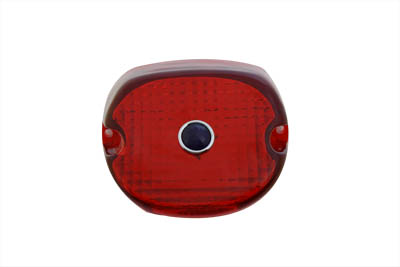 Tail Lamp Lens Laydown Style Red$12.80
 Tail Lamp Stock Type Red Plastic Lens$12.80
 Spring Fork Spotlamp Bulb 6 Volt$12.80
 Tail Lamp Lens Plastic Red$12.80
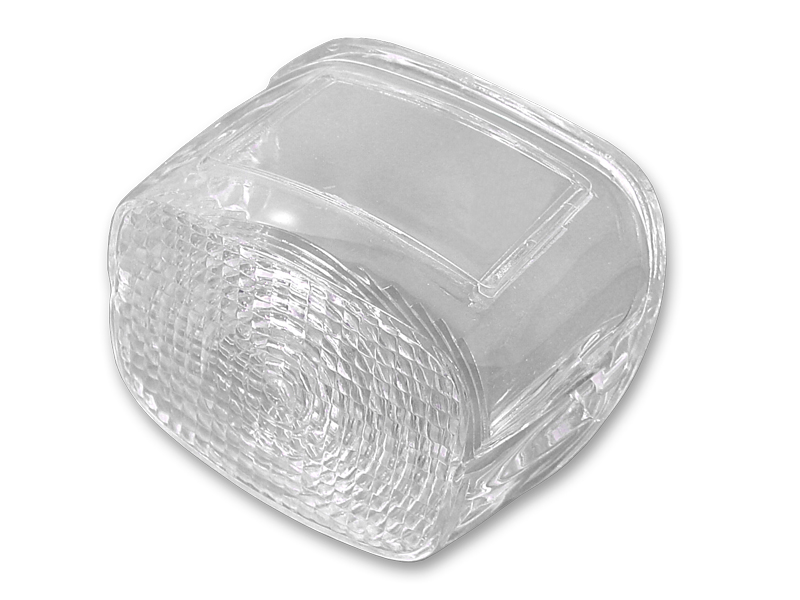 *UPDATE Tail Lamp Lens Stock Clear$12.94
 *UPDATE Tail Lamp Lens Laydown Style Clear$12.94
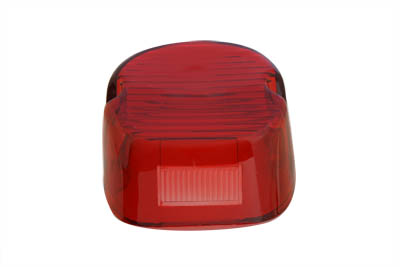 *UPDATE Tail Lamp Lens Laydown Style Red$12.94
 *UPDATE Tail Lamp Plastic Clear Lens$12.94